Asura Strike: Changing the After-Cast Image


 (10 votes, average: 3.60 out of 5)
What you need:
1. The base .tga files of the original Asura image. (ripped from sdata.grf using a .grf editor. ex. Gryff’s)
2. Adobe Photoshop (I use CS2, the version doesn’t really matter)
3. Basic knowledge of Alpha Filters
How to do it:
STEP ONE
Rip all of the asura1~asura6.grf and asura11~asura16.grf images from your sdata/adata.grf using a grf editor.
– asura1~asura6 = the 6 chinese words/images shown when a monk casts asura
– asura11~asura16 = the 6 chinese words/images shown when a champ casts asura
STEP TWO
Open asura1.tga with your Adobe Photoshop and go to the channels tab beside the layers.
Click on the “Alpha 1″ channel.
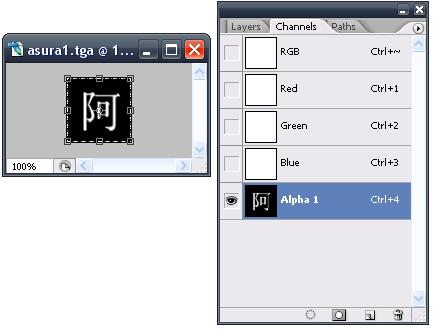
STEP THREE
Using the Rectangle tool/Brushes, make the whole “Alpha 1″ channel black.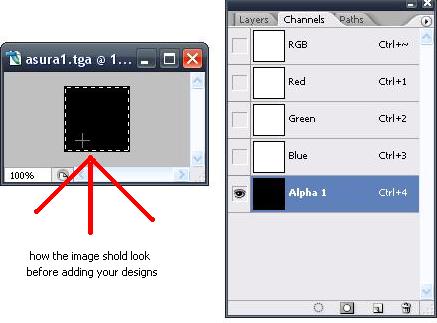
Now that the background is all black, you can now add in your designs/texts.
STEP FOUR
Add your own designs/texts to the black “Alpha 1″ channel.
In my “ASAWIK” image, I wrote in
“A” on asura1.tga & asura11.tga
“S” on asura2.tga & asura12.tga
“A” on asura3.tga & asura13.tga
“W” on asura4.tga & asura14.tga
“I” on asura5.tga & asura15.tga
“K” on asura6.tga & asura16.tga
You can put in any 6 letter word, or even fit in 2 letters on 1 .tga to make an even longer word.
Edit each of the .tga’s. You can also just edit 1~6, duplicate them, and rename them to 11~16.
Save them to your \Gravity\RO\data\texture\effect\ folder when finished
NOTE: Only draw/write things on the “Alpha 1″ channel layer. And your letters/draws should look a bit like the size of the original chinese characters. If not, your letters will show up too big in-game.
STEP FIVE
Go Asura someone or have someone Asura you to test if it works.
Credits go to me, my aliases include Rune(Frozenglade RO), Infrared(BattleRO), Zirkysaurus(PuddingsRO)
Filed under: How to ..., Other RO Writings
wow really kool :D had no idea about this
This is really cool, But is photoshop a must?
(ripped from sdata.grf using a .grf editor. ex. Gryff’s)
can u tell me the detail of ripping?i understand
i mean i dont understand**
Can you use it with GIMP?
Umm one quick question, my server has a rule saying that we are not supposed to edit the client…so does doing this mean a ban? xD
Keep in mind that this modification will only affect you (and others playing on your computer) and NOT everyone on your server, unless everyone on the server downloads and applies your modification.
So when you asura someone, they’ll see the original message, unless they have the mod too.
I think the after cast image is not important, the most important is how much damage can you bring out with a single asura :3
Fante1stico blog! Vocea tem alguma reomdencae7e3o para aspirantes a escritores ? Estou esperando para comee7ar o meu prf3prio blog em breve, mas estou um pouco perdido em tudo. Vocea aconselharia a comee7ar com uma plataforma livre como WordPress ou ir para uma ope7e3o paga ? He1 tantas ope7f5es le1 fora, que eu estou totalmente dominado .. Alguma reomdencae7e3o? Cheers! melhores desejos !